Yapıları analiz edin, tasarlayın ve izleyin. Analyse, design and monitor structures.
Bina ve çeşitli yapı türlerinin doğrusal olmayan performans analizi, betonarme/çelik/yığma tasarım ve yapı sağlığı izleme için geliştirilmiş mühendislik yazılımı. Yüksek performanslı dahili çözücü ve OpenSees entegrasyonu bir arada.
Engineering software for nonlinear performance analysis of buildings and other structures, RC/steel/masonry design and structural health monitoring — with a high‑performance built‑in solver and OpenSees integration.
Windows · Küçük projelerde ücretsiz kullanım · Örnek verileri indir Windows · Free for small projects · Download sample data

Tasarımdan performansa, analizden izlemeyeFrom design to performance, from analysis to monitoring
StructPlus; tasarım, doğrusal olmayan modelleme, dinamik çözüm ve sinyal işleme için ihtiyaç duyduğunuz araçları tek bir arayüzde toplar. Günler süren işler saatlere iner.
StructPlus brings design, nonlinear modelling, dynamic solvers and signal processing together in a single interface — turning days of work into hours.
Yeni Yapı TasarımıDesign of New Structures
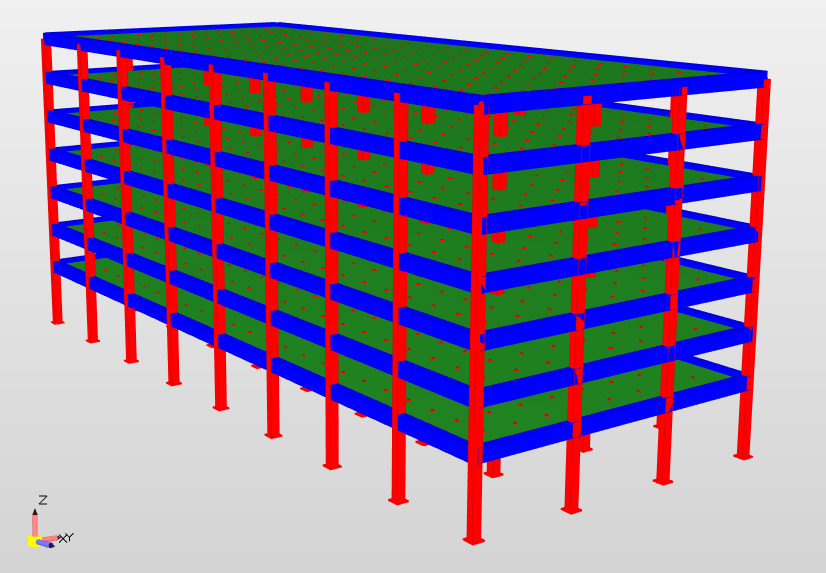
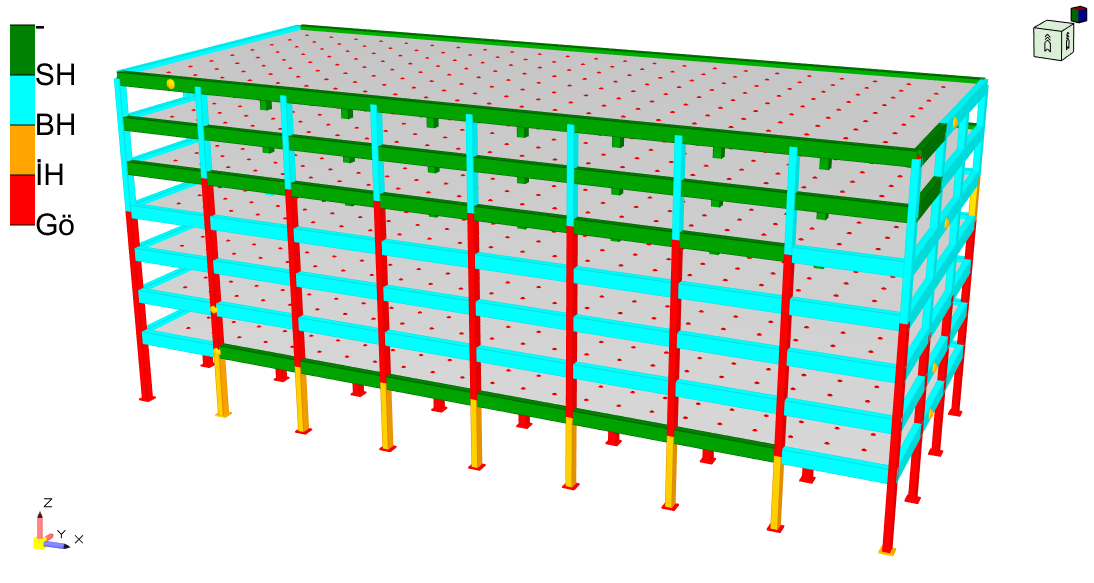
SAP2000/ETABS modelinden betonarme, çelik ve yığma eleman tasarımı; 3B E/K gösterimi, raporlar ve DXF çıktısı.
RC, steel and masonry member design from SAP2000/ETABS models; 3D D/C display, reports and DXF output.
DetaylarDetailsDoğrusal Olmayan ModellemeNonlinear Modelling
Donatı ataması, sargılı beton (Mander) modeli, moment‑eğrilik ve plastik mafsalların ETABS'a otomatik aktarımı.
Reinforcement assignment, confined concrete (Mander), moment‑curvature and automatic hinge export to ETABS.
DetaylarDetailsOpenSees & Fiber SonuçlarıOpenSees & Fiber Results
Fiber kesitler, MVLEM perde elemanları, Concrete04 ve farklı çözücü/integrasyon seçenekleriyle OpenSees kodu üretimi.
Fiber sections, MVLEM wall elements, Concrete04 and alternative solver/integration options with generated OpenSees code.
DetaylarDetailsEigenvalue & Ritz ÇözücülerEigenvalue & Ritz Solvers
Intel oneAPI ile hızlandırılmış dahili doğrusal çözücü; hem Eigenvalue hem Ritz modal analiz desteği.
Built‑in linear solver accelerated with Intel oneAPI; supports both Eigenvalue and Ritz modal analysis.
DetaylarDetailsSinyal & Yer HareketiSignals & Ground Motions
FFT, PSD, filtreleme, trendden arındırma ve kayıtların hedef spektruma göre ölçeklendirilmesi.
FFT, PSD, filtering, detrending and scaling of records to a target spectrum.
DetaylarDetailsYapı Sağlığı İzlemeStructural Health Monitoring
Seyrek sensör verisinden tüm yapının yer değiştirme, iç kuvvet ve eleman hasarının gerçek zamanlı hesabı.
Real‑time displacement, internal force and member damage for the whole structure from sparse sensor data.
DetaylarDetailsSensörden hasar haritasına: dijital ikizFrom sensors to damage maps: the digital twin
Yapının dijital ikizi StructPlus'a yüklenir; birkaç noktadaki sensör ölçümlerinden, MSSM yöntemiyle yapının her noktasındaki yer değiştirme, kesit kuvveti ve eleman hasarı anlık olarak hesaplanır. Raporlar sunucuda otomatik hazırlanıp bina yöneticisine iletilebilir.
Load the structure's digital twin into StructPlus; from a handful of sensors, the MSSM method instantly reconstructs displacements, section forces and member damage at every point. Reports can be generated automatically on a server and sent to the building manager.
Kurulum ve OpenSees hazırlığıInstallation & OpenSees setup
StructPlus, doğrusal olmayan analizler için OpenSees'in Python sürümünü (OpenSeesPy) kullanır. Aşağıdaki adımlarla birkaç dakikada hazır olun.
StructPlus runs the Python version of OpenSees (OpenSeesPy) for nonlinear analysis. Get ready in a few minutes with the steps below.
StructPlus'ı indirin ve kurunDownload and install StructPlus
Kurulum dosyasını indirip çalıştırın. Program küçük projelerde ücretsiz kullanılabilir.
Download and run the installer. The program is free to use for small projects.
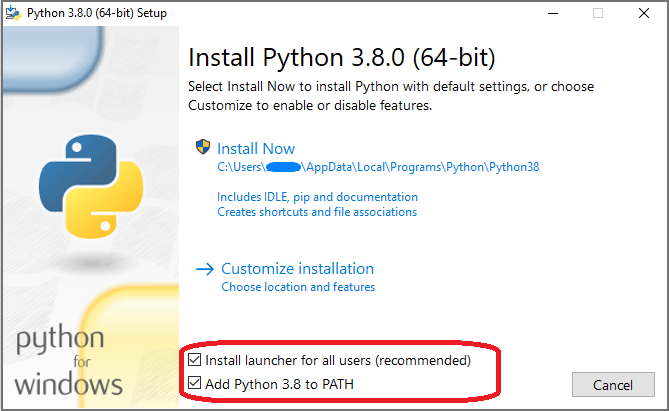
Python 3.12.10'u kurunInstall Python 3.12.10
Kurulumda “Install launcher for all users” ve “Add Python to PATH” seçeneklerini işaretleyin.
During setup, tick “Install launcher for all users” and “Add Python to PATH”.
Komut İstemi'ni (CMD) açınOpen Command Prompt (CMD)
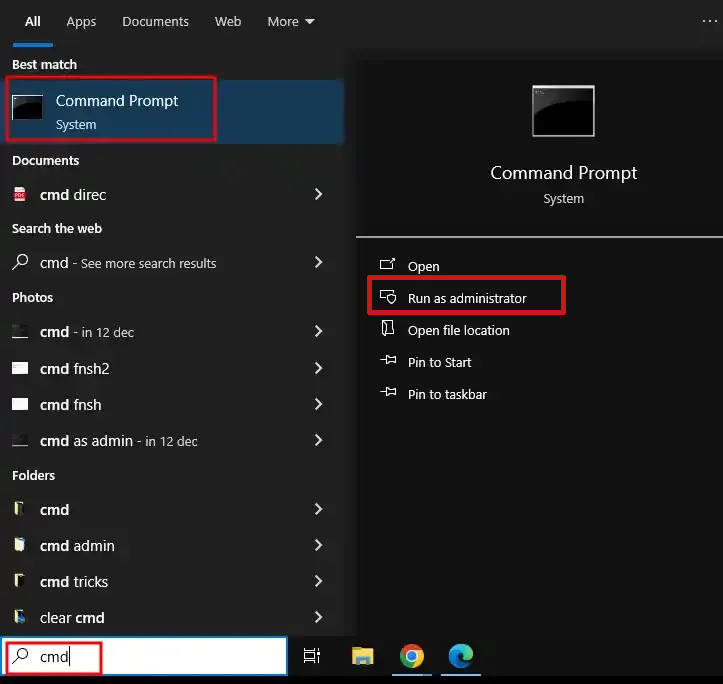
Başlat menüsüne cmd yazarak Komut İstemi'ni çalıştırın.
Type cmd in the Start menu to open the Command Prompt.
OpenSeesPy'ı yükleyinInstall OpenSeesPy
Aşağıdaki komutu CMD'de çalıştırın:
Run the following command in CMD:

Kurulumu doğrulayınVerify the installation
Görselde mavi ile işaretlenen komutları girerek OpenSees'in doğru yüklendiğini kontrol edin. Hepsi bu — artık StructPlus'tan doğrusal olmayan analiz çalıştırabilirsiniz.
Enter the commands marked in blue in the image to check that OpenSees is installed correctly. That's it — you can now run nonlinear analyses from StructPlus.

Hemen denemeye başlayınStart right now
Küçük projelerde ücretsiz kullanın; büyük projeler için yıllık lisans edinin.
Use it free for small projects; get an annual licence for large projects.