OpenSees, ETABS ve Perform‑3D karşılaştırmalı örnek veri setiA benchmark data set comparing OpenSees, ETABS and Perform‑3D
StructPlus, ETABS verilerini okuyup OpenSees modelleri hazırlayabilir. Bu özellik kullanılarak 6 katlı perde duvarlı bir bina OpenSees, ETABS ve Perform‑3D ile modellenmiş ve sonuçlar karşılaştırılmıştır. Ayrıca TDY2007, TBDY2018 ve 2025 taslak tebliği ile hazırlanan modellerin performansları kıyaslanmıştır.
StructPlus can read ETABS data and prepare OpenSees models. Using this feature, a 6‑storey shear‑wall building was modelled in OpenSees, ETABS and Perform‑3D and the results were compared. The performance of models prepared with TDY2007, TBDY2018 and the 2025 draft communiqué was also compared.
compare_data.zip
Doğrusal olmayan analiz için örnek verilerin tamamı — ETABS, OpenSees ve Perform‑3D modelleri, zaman tanım alanı ve pushover klasörleri.
All sample data for nonlinear analysis — ETABS, OpenSees and Perform‑3D models plus time history and pushover folders.
Dosya içeriğiFile content
ETABS verilerinden OpenSees ve Perform‑3D ile sonuç karşılaştırması.
ETABS data to compare results with OpenSees and Perform‑3D.
OpenSees verilerinden ETABS ve Perform‑3D ile karşılaştırma. StructPlus ile açıp analiz edin.
OpenSees data to compare with ETABS and Perform‑3D. Open and analyse it in StructPlus.
Perform‑3D verilerinden ETABS ve OpenSees ile sonuç karşılaştırması.
Perform‑3D data to compare results with ETABS and OpenSees.
TDY2007, TBDY2018 ve 2025 taslak tebliği ile hazırlanmış modeller. StructPlus ile açıp analiz edin.
Models prepared with TDY2007, TBDY2018 and the 2025 draft communiqué. Open and analyse in StructPlus.
TDY2007, TBDY2018 ve 2025 taslak tebliği ile hazırlanmış modeller. StructPlus ile açıp analiz edin.
Models prepared with TDY2007, TBDY2018 and the 2025 draft communiqué. Open and analyse in StructPlus.
Verileri nasıl kullanırım?How do I use the data?
Paylaşılan veriler Perform‑3D, ETABS ve OpenSees ile analiz edilebilir.
The shared data can be analysed with Perform‑3D, ETABS and OpenSees.
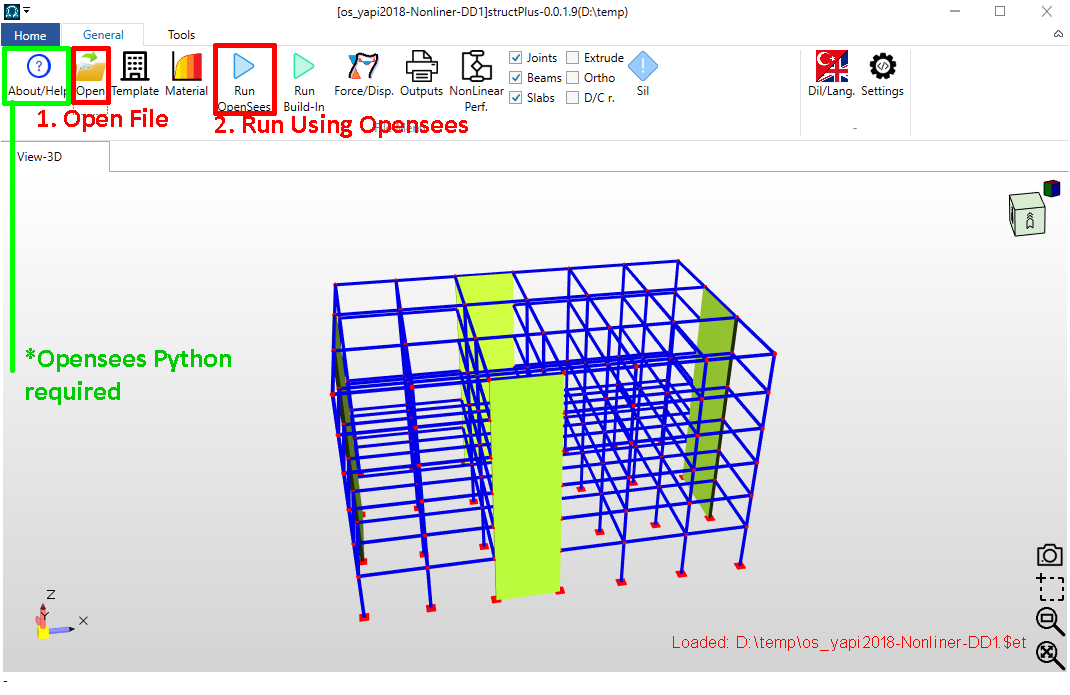
- İlgili klasördeki verileri StructPlus ile açın
- Open the data in the relevant folder with StructPlus
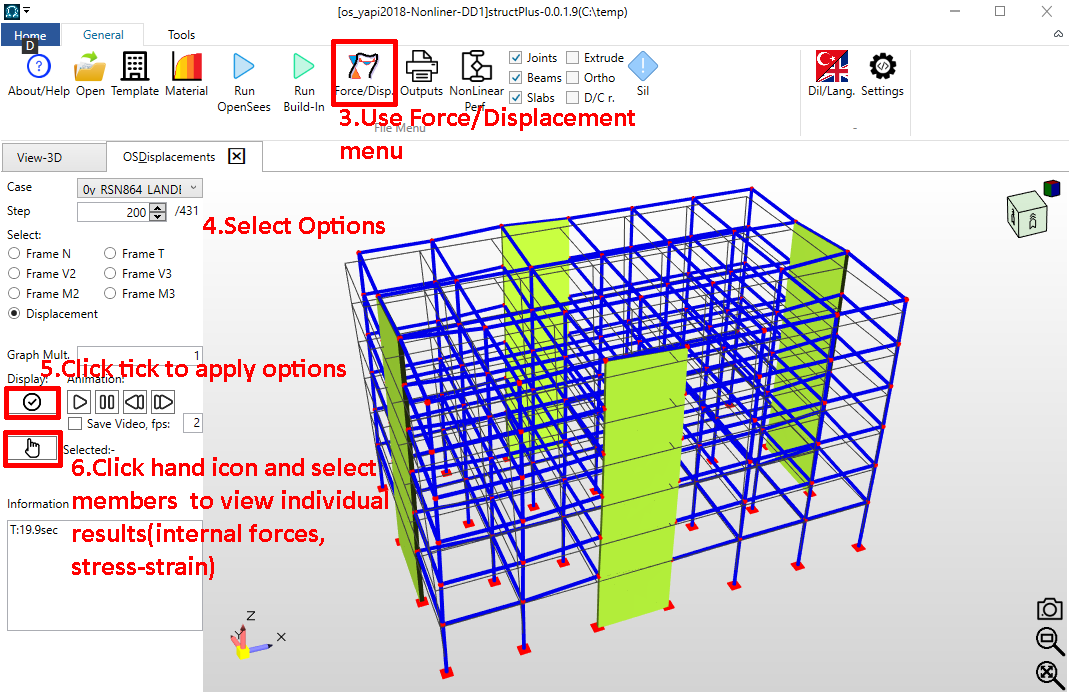
- Doğrusal olmayan analizi (OpenSees) çalıştırın
- Run the nonlinear (OpenSees) analysis
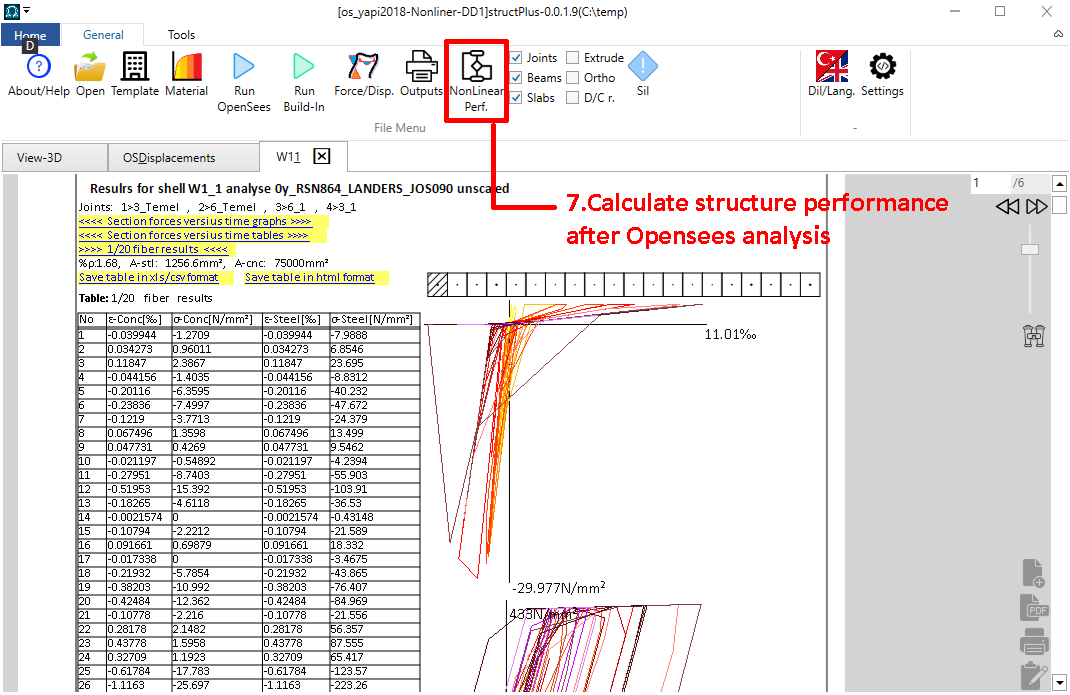
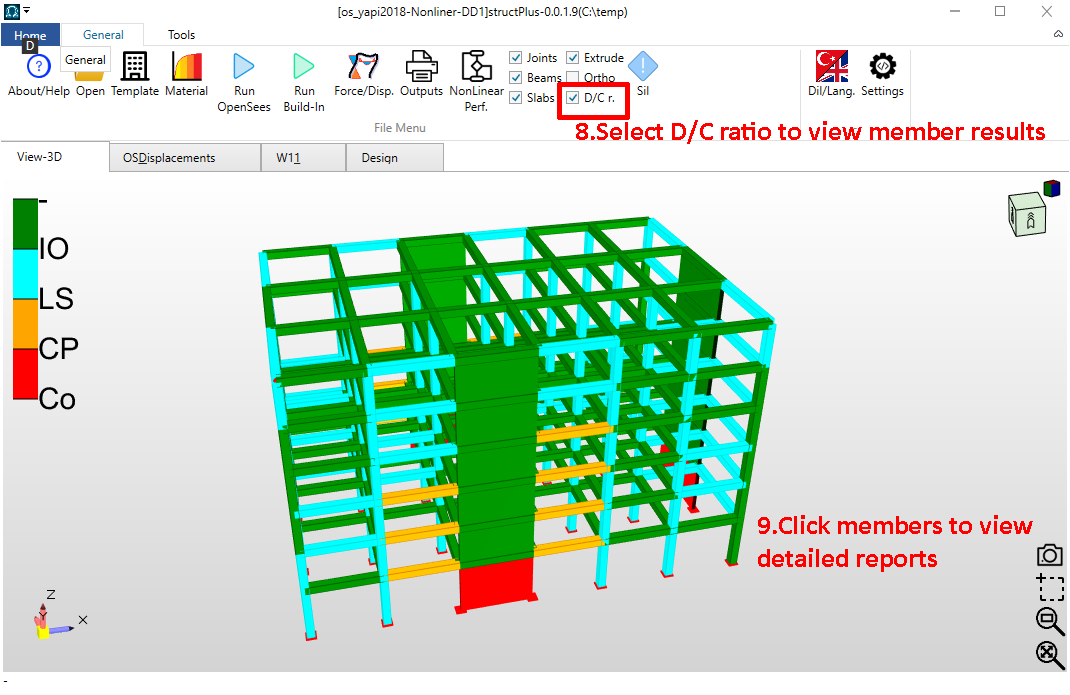
- Analizden sonra yapının performansını hesaplayın
- Calculate the structure's performance after the analysis
OpenSees kurulumu için ana sayfadaki adımlara bakın.
See the steps on the home page for OpenSees setup.
Yapılacak işlemlerWorkflow
İşlemleri açıklayan ekran görüntüleri aşağıdadır. Büyütmek için tıklayın.
Screenshots explaining the workflow are below. Click to enlarge.